
Everything about Automation Rules
Brain, local vs global rules, engine, monitoring, create popup and practical recipes

The Rules tab is the BeepMi brain: internally codenamed "Brain". It's where you create automations that run on autopilot: pause campaigns with low ROAS, reactivate them when they recover, scale top performers' budgets, alert when something breaks. All 24/7, no need to open BeepMi.
A rule is a set of conditions + action. Example: "IF ROAS < 0.8 over the last 6h AND spend > $20 → PAUSE adset". BeepMi evaluates the condition on regular loops and runs the action automatically when it triggers.
Rules tab: overview
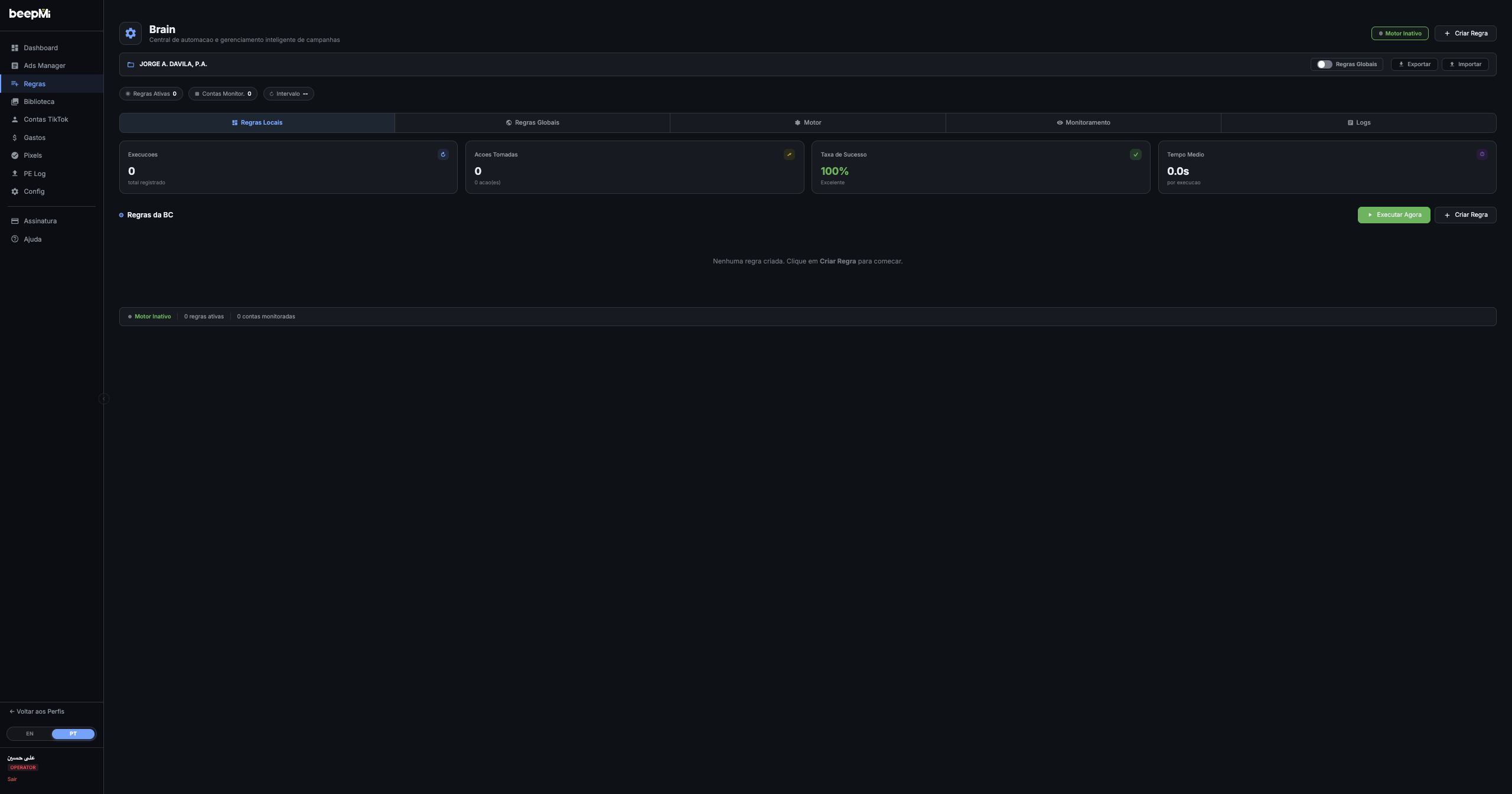
The page has 5 tabs (top to bottom): Local Rules · Global Rules · Engine · Monitoring · Logs. Each one has a purpose:
| Tab | Purpose |
|---|---|
| Local Rules | Rules that apply only to one specific BC (the one selected in the header) |
| Global Rules | Rules that apply to all BCs in the profile at once |
| Engine | Turns the automation engine on/off + adjusts timers and global cycle |
| Monitoring | Selects which accounts/campaigns get monitored by the rules |
| Logs | Full execution history (what ran, when, result) |
Above the tabs you'll find 4 real-time stats for engine performance:
Executions (total recorded)
Counter for each engine cycle (even if no action was taken). Goes up every cycle.
Actions Taken (number of actions)
How many times a rule triggered and actually changed something (paused adset, changed budget, etc).
Success Rate (%)
% of actions executed successfully. Green >95% = healthy engine. Red <85% = could be an expired TikTok login or a suspended BC.
Avg Time (seconds per execution)
How fast each engine cycle finishes. Usually 2-10s. If it spikes, BeepMi might be hitting TikTok's request limit.
Creating your first rule
Click + Create Rule (top-right corner or in the "BC Rules" card). The creation popup opens:
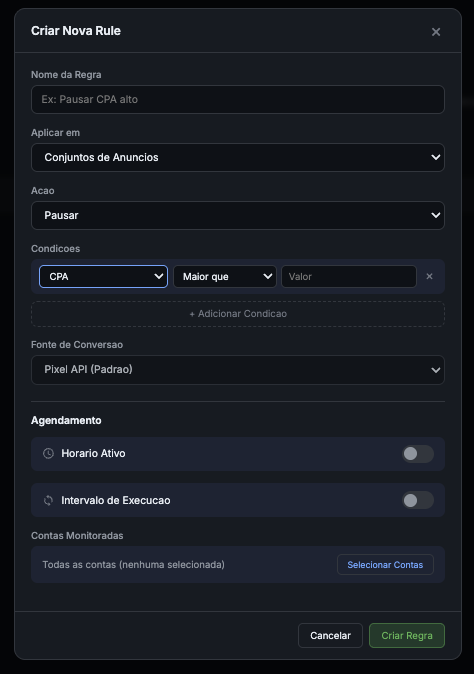
Modal fields, one by one
Rule Name
Free text. Use something descriptive: e.g. "Pause CPA > $30", "Activate ROAS > 2x", "Scale top performers +20%". Shows up in logs and listings.
Apply to (rule scope)
Which level of the hierarchy the rule acts on. Options: Campaigns, Adsets (default), Ads. Most rules run on adsets (ideal granularity between account and ad).
Action
What happens when the condition triggers. Options: Pause, Activate, Increase budget (+%), Decrease budget (-%), Set budget (fixed value), Notify (sends email/WhatsApp without touching the campaign).
Conditions (1 or more: all must trigger)
Each condition has 3 parts: metric + operator + value. Example: CPA / Greater than / 30. Available metrics: CPA, ROAS, Spend, Revenue, Clicks, Conversions, IC, CTR, CPC, CPM, Impressions, etc.
Click + Add Condition to stack multiple (e.g. CPA > 30 AND Spend > 100). All must be true for the action to fire.
Conversion Source
Where BeepMi pulls the conversion count from to compute CPA/ROAS. Options: Pixel API (default) = TikTok Pixel installed on the site · Custom Conversions = custom events you've configured · Server-Side = direct server-to-TikTok tracking. Pixel API works for 95% of cases.
Schedule (optional: toggles)
Active Hours: rule only runs at certain hours (e.g. 8am to 10pm). Good to avoid pausing at night when metrics are noisy.
Run Interval: how often the rule is evaluated. Default = 30min global cycle. You can set 10min to 24h.
Monitored Accounts
Select which ad accounts the rule will run on. Default = "All accounts (none selected)". Click Select Accounts to pick specific ones (e.g. to test a rule on 1 account before applying to all).
Cancel / Create Rule
Click Create Rule and done: the rule appears in the "Local Rules" tab list (or "Global" if you created it from the global tab button). It's not running yet until the engine is turned on (next step).
Start simple: "IF ROAS < 0.8 AND Spend > $30 → Pause adset". Apply to all adsets. That alone cuts losers without touching winners. Add more rules as you learn.
Local Rules vs Global Rules
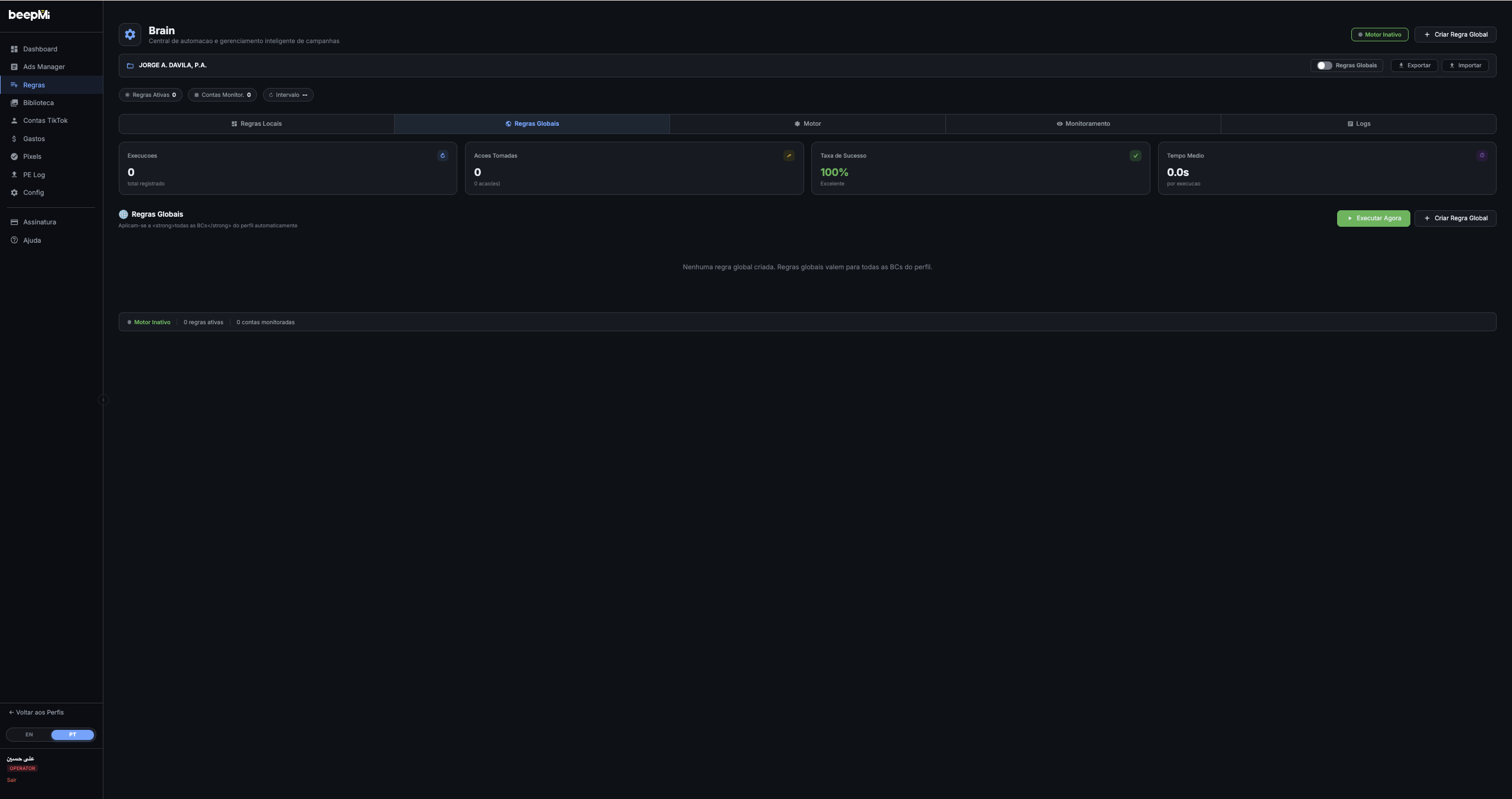
Local Rules
- Bound to 1 BC only
- The BC selected in the header
- Each BC has its own rules
- Ideal for specific behaviors
- E.g. client A pauses CPA > 15, client B pauses CPA > 50
Global Rules
- Apply to all BCs in the profile
- "Global Rules" toggle at top
- Cross-BC standardization
- Ideal for universal policies
- E.g. "any BC, ROAS < 0.5 = pause"
Yes. Local and global rules coexist. If conditions match in both, both execute. Be careful not to create conflicts (e.g. local "ROAS < 1 = pause" + global "Spend > 100 = increase budget").
Automation Engine
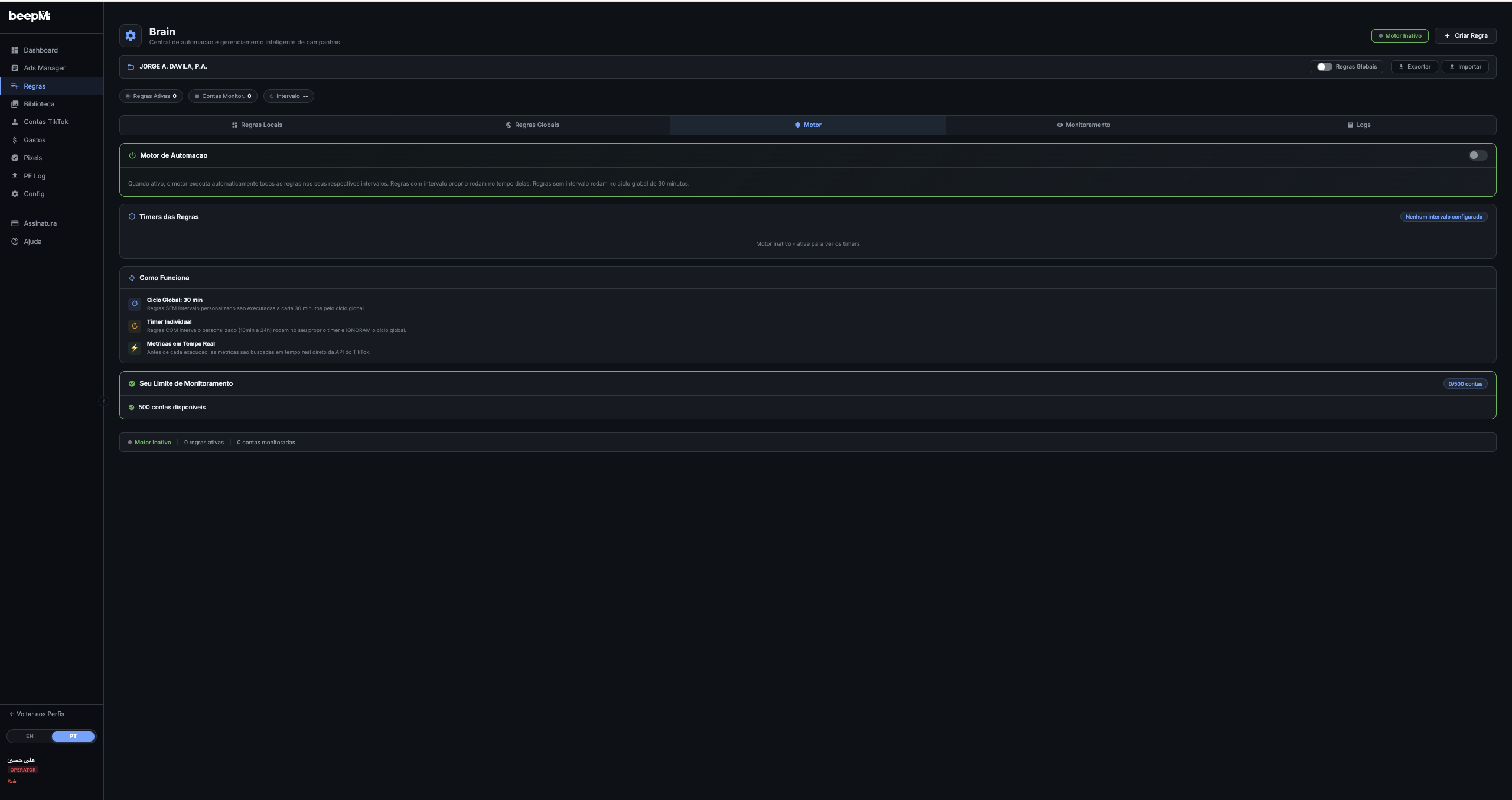
The engine is the rule executor. Without it on, your rules exist but don't run: they sit dormant. To activate it, go to the Engine tab and flip the Automation Engine toggle at the top.
How the engine works
Global Cycle: 30 minutes
Rules WITHOUT a custom interval run every 30 minutes automatically. The global cycle evaluates all your "default" rules at the same time. It's the standard cadence.
Individual Timer
Rules WITH a custom interval (10min to 24h) run on their own timer and ignore the global cycle. Useful for rules that need to be more aggressive (10min) or less sensitive (12h).
Real-time Metrics
Before each execution, BeepMi fetches metrics in real time straight from TikTok: no stale data. This guarantees CPA/ROAS are fresh when evaluating the condition.
If you created 10 rules but the engine is off, nothing happens. Always check the badge in the top-right of the screen: "Engine Inactive" (red) or "Engine Active" (green).
Monitoring limit
Each plan has a limit on accounts monitored by the engine:
| Plan | Monitorable accounts |
|---|---|
| 24h Trial | up to 50 accounts |
| Growth | up to 100 accounts |
| Scale | up to 500 accounts |
| Dominate | unlimited |
The counter "X/500 accounts" in the Engine tab shows how much of the limit you're using. If you go over, the engine stops monitoring excess accounts (it doesn't pause the rules, just stops monitoring extras).
Monitoring: selecting accounts
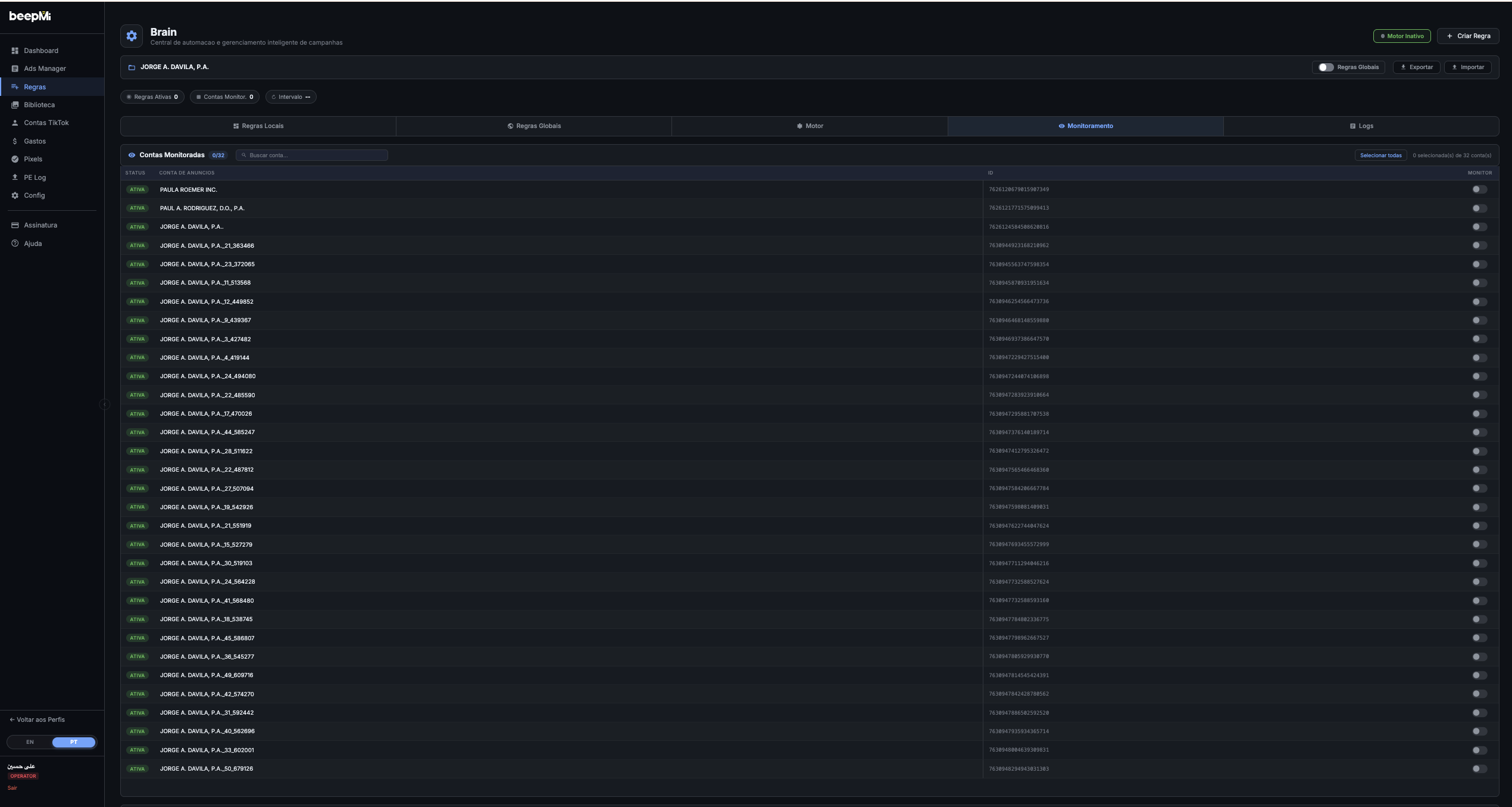
The Monitoring tab lists all ad accounts in the selected BC. You check the boxes to include each one in the engine's scope. By default, none are checked: you choose.
Check the accounts to be monitored
Click the checkbox next to each account name, or click Select all at the top to include everything at once.
Use search to filter when there are many accounts
There's a search field at the top. Useful when the BC has 50+ accounts and you only want to monitor specific ones.
Saves automatically
No "Save" button: BeepMi persists immediately. Rules start running on the checked accounts on the next engine cycle.
Start by monitoring just a few accounts (3-5) and your most conservative rules. Verify everything is running as expected. Then expand to all accounts. This avoids mass-pausing campaigns by accident due to a miscalibrated rule.
Logs: engine audit
The Logs tab shows everything the engine did. Each row = 1 rule execution. You see: date/time, rule name, which account, which adset/ad, condition evaluated, result (Triggered / Not triggered), action taken.
1) Debugging: find out why a rule didn't fire (condition didn't match). 2) Audit: prove to a client that the rule ran X times. 3) Optimization: see which rules are firing too much (probably too aggressive) or too little (too conservative).
Other page buttons
▶ Run Now
Forces immediate execution of all rules, ignoring the timer. Useful to test if a brand-new rule will fire (without waiting 30min).
↓ Export / ↑ Import
Exports all BC rules to a file. Imports back into another BC or another profile. Great for replicating config across accounts/clients.
Filters: Active Rules / Monitored Accts / Interval
Top pills let you filter the list. Active Rules X shows only rules with engine on, Monitored Accts X filters by monitored accounts, Interval filters by timer (10min, 30min, 1h, etc).
Practical recipes
IF ROAS < 0.8 AND Spend > $30 → Pause adset · Interval: 30min · Apply to: Adsets
IF ROAS > 2.5 AND Spend > $50 → Increase budget +20% · Interval: 4h (scale slowly) · Apply to: Campaigns
IF Hour >= 02:00 AND Hour < 06:00 → Pause adset · Apply to: Adsets · Active Hours: 02:00-06:00
IF Daily Spend > $100 → Notify (without pausing) · Interval: 1h · Apply to: Campaigns
Troubleshooting
Checklist: 1) Engine on? (green badge at top) · 2) Account in Monitoring? · 3) Conditions actually matching? (check Logs) · 4) TikTok login still valid in Settings?
BeepMi might be hitting TikTok's request limit. Fix: increase rule intervals (from 10min to 30min) and reduce the number of monitored accounts.
TikTok login probably expired or BC was suspended. Go to Settings → reconnect TikTok to reauthorize.
Next steps
Learn the Ads Manager (M1 vs M2) · Power Editor for 50+ campaigns
