
Everything about the Pixels tab
Sync, bulk-link pixel (single, BC, global), permissions and troubleshooting

The Pixels tab exists to solve a specific pain: when you have a TikTok pixel created inside a Business Center but need to link it to every ad account in that BC, doing it manually is one click per account. With 32 accounts, that's 32 clicks. With 100, it's 100. The Pixels tab in BeepMi does it in a single action per BC: or across every BC at the same time.
It's the tracker that measures what happens on your site after the ad click: view content, add to cart, purchase. A pixel lives inside a BC, but each ad account has to "link" the pixel to use it as a conversion source in campaigns. Without that link, the account can't optimize for conversion using that pixel.
Pixels tab overview
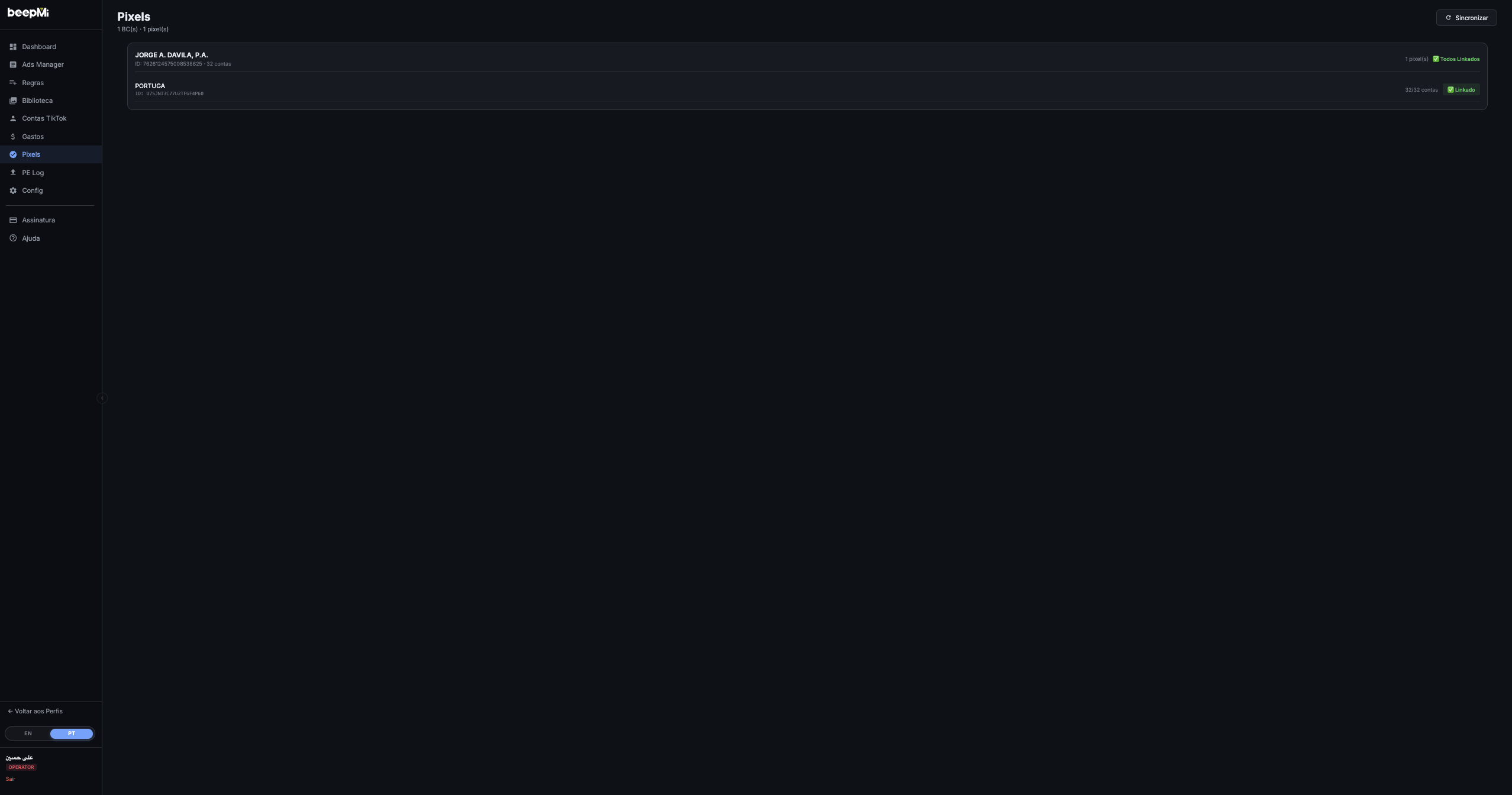
The page has 3 visible parts:
| Area | What it has |
|---|---|
| Header | "Pixels" title, "X BC(s) · Y pixel(s)" counter, Sync button and green Link ALL button (only shows when there's a pixel not fully linked) |
| Card per BC | BC name, ID, total accounts, pixel counter, BC global status (✅ All Linked or Link All button) |
| Pixel rows | Inside each card: pixel name + technical-looking ID, "X/Y accounts" counter, and ✅ Linked badge or Link button |
How to sync pixels
On first visit the screen shows "Click Sync to load pixels from all BCs". Click the 🔄 Sync button (top right).
What Sync does
Asks TikTok for every BC in the profile, fetches the pixel list of each one and, for each pixel, counts how many accounts in that BC already have it linked. The result becomes the list of cards on screen.
How long it takes
Usually 5-15s for a small profile (1-3 BCs). May take 30-60s for a profile with 10+ BCs and hundreds of accounts. The header counter ("X BC(s) · Y pixel(s)") only updates at the end.
When to re-sync
Whenever: 1) you create a new pixel on TikTok, 2) connect a new BC, 3) suspect a pixel got unlinked. Sync changes nothing: it only reads current state.
Reading the list: BC card
Each BC becomes a card. The card header shows the BC's aggregate status:
Means every pixel in that BC is linked across 100% of the BC's accounts. Full coverage, nothing to do.
Shows when at least one pixel in the BC isn't in every account. Click links all pixels in the BC at the same time across the missing accounts (skips the ones that already have it: no duplicates).
Pixel rows inside the card
Each pixel in the BC becomes a row. You see:
Pixel name + ID
e.g. "PORTUGA · ID: D75JNI3C77U2TFGF4P60". That technical-looking ID is the pixel's unique code on TikTok: useful when someone asks you to confirm which pixel is which.
"X/Y accounts" counter
"32/32 accounts" = pixel is in every one of the BC's 32 accounts. "15/32 accounts" = missing in 17. This counter is your per-pixel coverage thermometer.
"✅ Linked" badge OR "Link" button
Green if fully linked. If at least one account is missing, it becomes a Link button that fires the link for that pixel only across the BC's missing accounts.
The 3 levels of "Link"
BeepMi has 3 link buttons at different scopes: knowing which one to use is the important part:
Button on the pixel row. Links that specific pixel to every account in its BC that doesn't have it yet. Use when you created a new pixel in a single BC.
Green button in the BC card header. Links all pixels in that BC to every missing account. Use when you want to normalize a specific BC at once.
Green button at the top of the page (only shows if there's a pending pixel in any BC). Links every pixel of every BC at once. Heavier operation but solves everything in one shot.
All 3 buttons show a confirmation popup before running ("Link pixel X to every account in this BC?"). There's no undo from BeepMi: to unlink, you have to go inside TikTok Ads Manager account by account.
What happens after the click
The button switches to "Linking..." and BeepMi fires the operation across every account at the same time (automatically grouping each account by the correct TikTok login). The on-screen wait is capped at ~5 minutes: past that BeepMi keeps working in the background but the popup says "Time limit: wait and reload".
When it completes, a notice shows:
Per BC: pixels linked
Lists each touched BC and within it each pixel: "PORTUGA: 32/32 linked". If any failed, it comes with a ⚠ warning.
Skipped (no permission)
Some accounts may be skipped because the connected TikTok login doesn't have permission to manage pixels on that specific account. "15 no permission".
Total + total time
Summary at the end: "Total: 256 linked, 18 skipped (no permission) | Time: 12.4s".
Errors (if any)
Lists pixel by pixel what went wrong, with the reason returned by TikTok. Useful for opening support with exact info.
Why multi-account matters
On TikTok the pixel lives in the BC but each account has to link the pixel separately to use it as a conversion source. If you create a campaign in an account that doesn't have the pixel linked, the campaign can't optimize for Purchase, Add to Cart, etc: TikTok doesn't see the events.
Every time you create a new pixel in TikTok Ads Manager, come back to BeepMi → Pixels → Sync → Link ALL. Guarantees the new pixel is distributed across 100% of the accounts before launching campaigns.
Practical recipes
Just connected a new BC with 50 accounts? Pixels → Sync → click Link All in the BC card. In ~15s every pixel of the BC is in all 50 accounts and ready for campaigns.
Once a month, open Pixels → Sync. Look for badges showing "X/Y" instead of "Y/Y": those are pixels that lost coverage (new account added to BC, manual unlink, etc). Click Link All on the affected BCs.
Created a new pixel in one BC only? Sync, find the new pixel's row (badge showing "0/32" or partial), click Link on that row only. Faster than linking everything in the BC.
Added 5 new BCs + created 3 new pixels? Link ALL at the top of the page. One operation solves everything. May take 30-60s: BeepMi groups the accounts by the correct TikTok login automatically.
Troubleshooting
Checklist: 1) Is the connected TikTok login still valid? (Settings tab) · 2) Does the BC have any pixel created in TikTok Ads Manager? Sync only reads what already exists: it doesn't create pixels. 3) Does the connected user have permission to manage pixels?
The TikTok user connected to BeepMi doesn't have permission to manage pixels on those specific accounts. Fix: go inside the TikTok BC, give "Manage Pixel" permission to the user that connected to BeepMi, then reconnect TikTok in Settings.
The operation took longer than the on-screen wait allows. BeepMi keeps working in the background: wait 1-2 min and click Sync again to see the actual result. If you had 200+ accounts to link in one shot, this is normal.
Linking OK ≠ pixel firing on the site. Check with TikTok Pixel Helper (Chrome extension) that the pixel is firing events on your site. If it isn't, the issue is pixel installation (tracking code missing on the site), not the BeepMi Pixels tab.
The 3 ways to track conversions
The Pixels tab only manages linking. But it helps to understand the 3 ways TikTok accepts conversion data:
| Source | What it is | Where it appears in BeepMi |
|---|---|---|
| Pixel | Code installed on the site, captures events through the user's browser | Pixels tab (this one) |
| Events API | Your server sends the events straight to TikTok (more reliable than pixel) | Configured inside TikTok, BeepMi just consumes |
| Server-Side | Events come from an intermediary tracking platform | Rules tab → Conversion Source |
When creating an automation rule, you pick which source to use to evaluate conversions (Rules → Create modal → "Conversion Source" field: Pixel API · Custom · Server-Side).
Next steps
Upload creatives via the Library · Launch 50+ campaigns via Power Editor · Set up rules to optimize automatically
