
How to upload a Smart+ Spark Ads campaign
5 steps for Smart+ with Spark: AI optimization, auth code, no banner (TikTok blocks via API)
Complete tutorial to create Smart+ campaigns with Spark Ads creatives in BeepMi. Combines TikTok AI optimization (Smart+) with authorized organic posts (Spark) to maximize performance with minimal manual setup.
Ideal combo for starting with minimal setup. TikTok AI decides bid, audience and optimizations automatically. You just upload the spark code, set budget and let it run. Great for scaling validated organic creatives.
TikTok blocks Display Cards via API for this campaign type. Even if the UI shows the option, any banner sent is ignored by TikTok. Use Manual + Spark or Manual + Upload if you need banner overlay on the video.
Before you start
You need:
- TikTok Business Center connected with campaign creation permission
- Pixel configured on the account (conversion tracking)
- At least 1 Spark Ads code generated by the creator in the TikTok app
- At least 1 active advertiser in the profile
Select Smart+ Campaign
In the first Normal tab, select Smart+ Campaign (right card with sparkle icon).
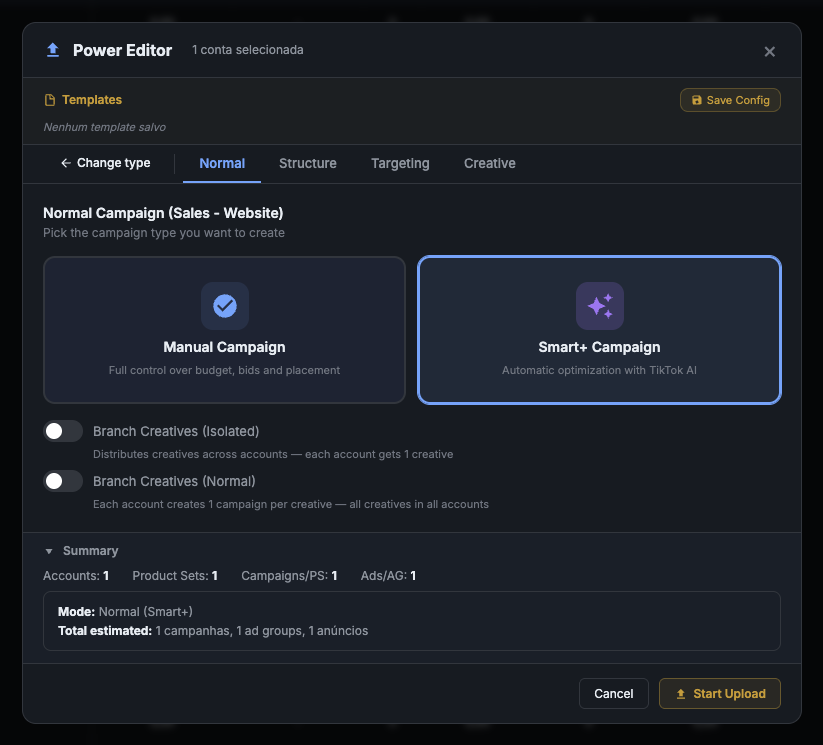
Smart+ Campaign: automatic optimization with TikTok AI. The platform picks the best audience, bids, placements and times on its own. You just provide creative + budget.
Manual Campaign: the opposite. You control everything manually. Use only if you have historical data to calibrate.
Smart+ works best when you have limited historical data or testing a new creative. AI accelerates the learning curve. Manual wins on mature campaigns with calibrated bid cap.
Simplified structure
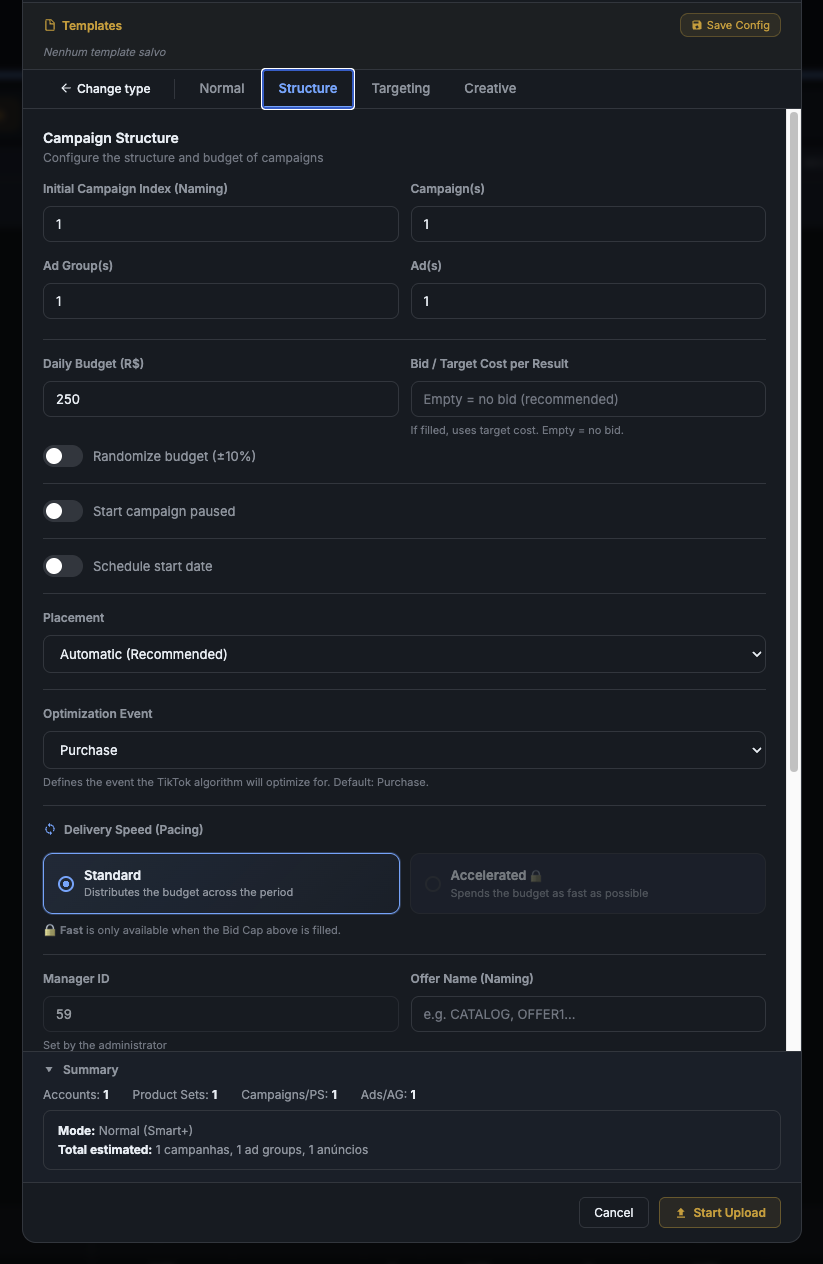
The Structure tab. Smart+ requires less configuration than Manual: AI handles most decisions.
Recommended setup
| Field | Default | When to change |
|---|---|---|
| Initial Index | 1 |
Keep 1 for first batch |
| Campaign(s) | 1 |
Increase to run multiple in parallel |
| Ad Group(s) | 1 |
Smart+ recommends 1 ad group per campaign |
| Ad(s) | 1 |
1 spark code = 1 ad |
| Daily Budget | $250 |
Smart+ needs more budget than Manual to learn. Min $100/day |
| Bid / Target Cost | empty | Smart+ works best without bid cap (let AI decide) |
| Placement | Automatic (Recommended) |
TikTok picks best placement per user |
| Optimization Event | Purchase |
Purchase for ecommerce. Add to Cart for ToFu |
Smart+ doesn't support "Accelerated" delivery because AI distributes budget throughout the day automatically. Keep on Standard.
Countries, languages and ID
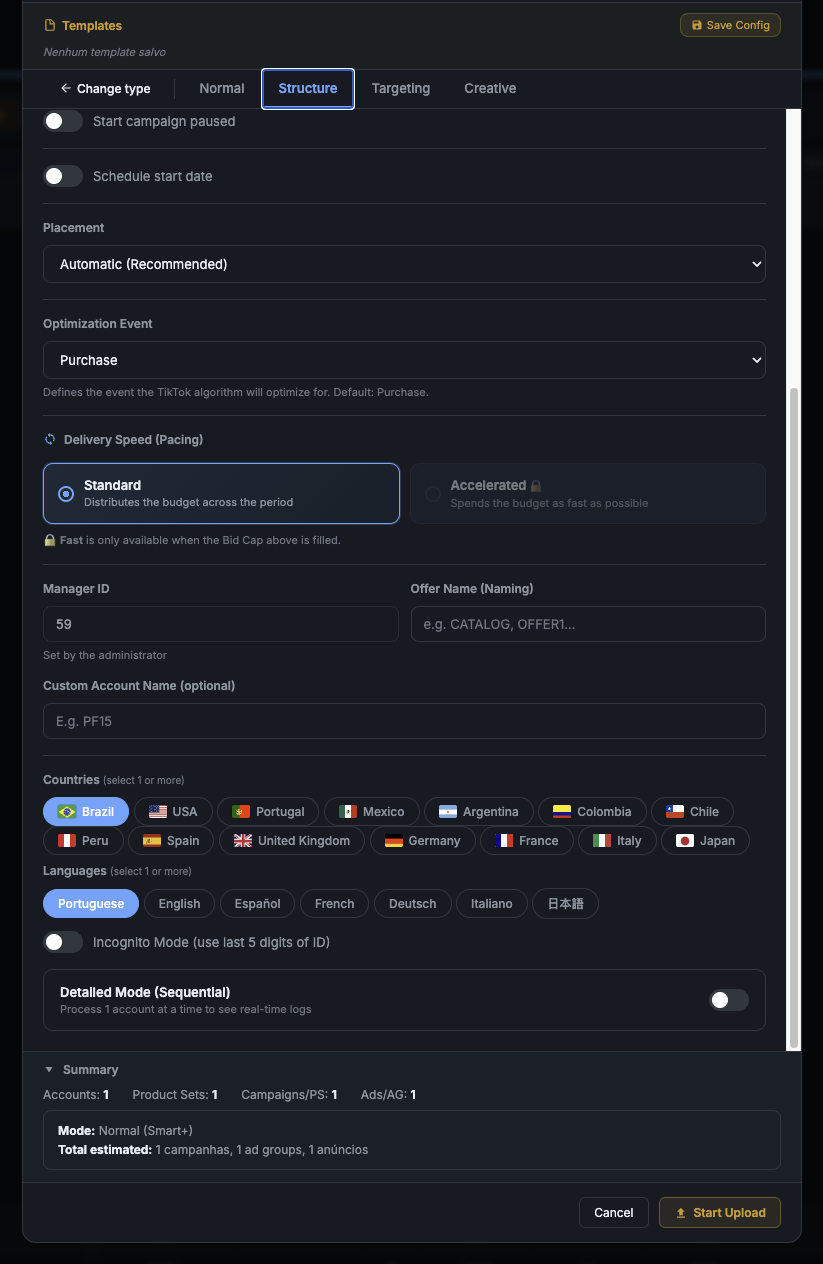
Continuation of Structure: defines geographic target market.
What each field does
- Manager ID: internal identifier (set by admin). Appears in campaign name.
- Offer Name: part of the naming convention. E.g.:
OFFER1,BLACK-FRIDAY. - Custom Account Name: optional label for identification.
- Countries: TikTok requires ≥ 1. Brazil default for Brazilian ecommerce.
- Languages: align with target market.
Processes 1 account at a time instead of parallel. Useful to debug with real-time logs. In Smart+ it doesn't make as much difference because AI is stable, but can help when testing new setup.
Reduced targeting (AI decides)
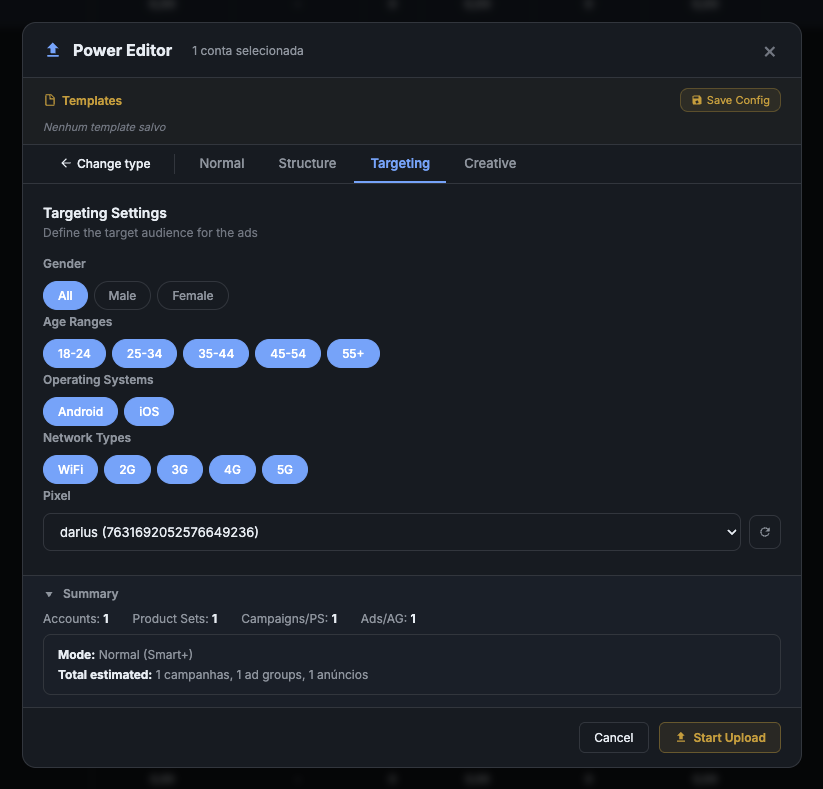
The Targeting tab in Smart+ has fewer options than Manual: TikTok AI picks detailed audiences automatically.
Recommended setup
- Gender:
All(let AI choose) - Age Ranges: check all (
18-24,25-34,35-44,45-54,55+) - Operating Systems:
Android + iOS - Network Types: all (
WiFi,2G,3G,4G,5G) - Pixel: select the account's pixel (required)
Smart+ depends entirely on pixel to optimize. If the dropdown is empty, go to Settings : Pixels and register the account's pixel before continuing.
Spark Ads + code + UTM (no banner)
The Creative tab. Pick Spark Ads and paste the authorization code.
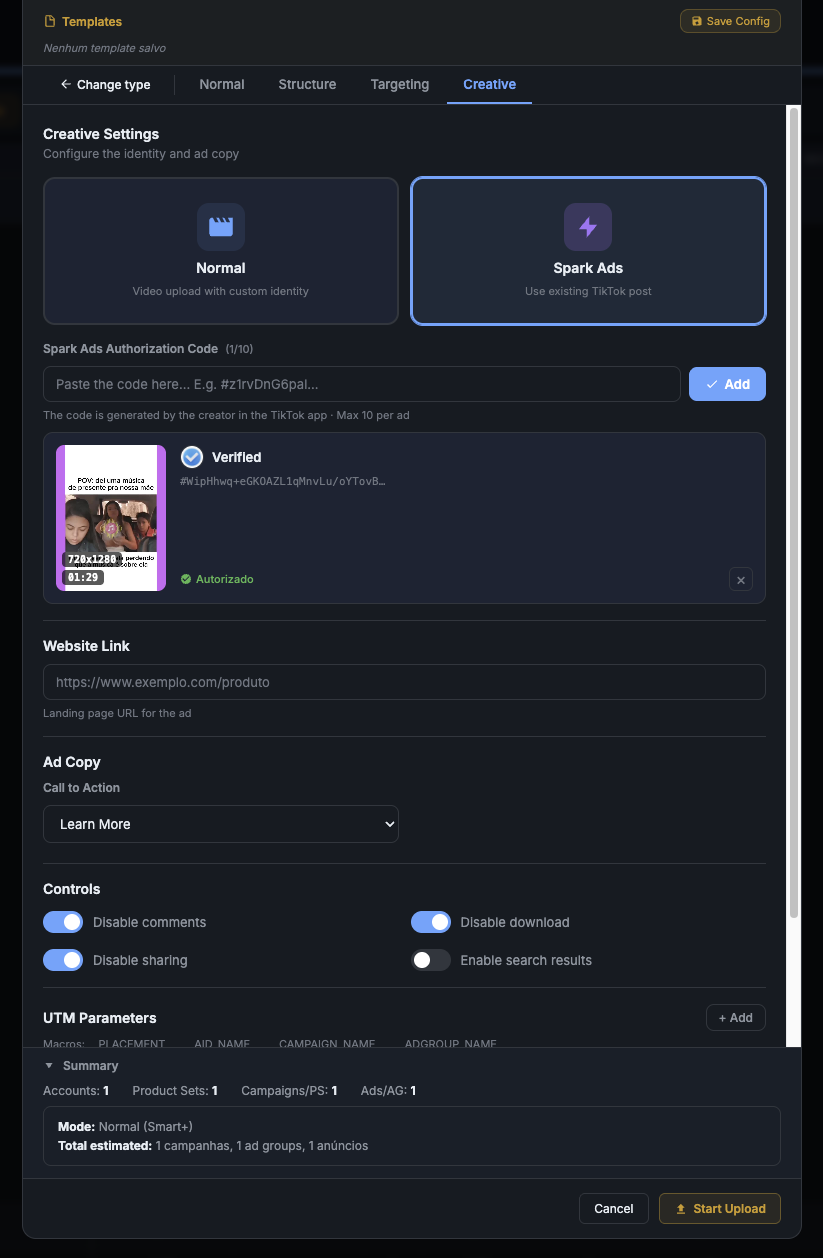
Steps
- Click Spark Ads (lightning ⚡ card, right side)
- Paste the code in
#WipHhwq+eGK0AZL1qMnvLu/oYTovB...format - Click Add
- Status changes to ✓ Verified · Authorized (green)
- Confirm thumbnail + video duration
Display Cards (Banner): NOT available
TikTok does not allow Display Cards via API for this combination (Smart+ + Spark). Even if the UI shows the option to create a banner, any Display Card sent is ignored by TikTok when processing the campaign.
If you need banner overlay on video, use one of these alternatives:
- Manual + Spark Ads: banner works normally
- Manual + Upload Video: banner works normally
- Smart+ + Upload Video: banner works normally
This is a documented TikTok Marketing API limitation, not a BeepMi bug.
Link, CTA and UTM
- Site Link: full landing page URL
- Ad Copy: video caption (max 100 chars recommended)
- Call to Action:
Learn More(ToFu),Shop Now(retargeting)
Controls
- Disable comments: recommended on new ads
- Disable download/sharing: protects your video
- Enable search results: only if you want it in organic search
Default UTM (same as other campaigns)
utm_source     = __PLACEMENT__
utm_medium     = __AID_NAME__
utm_campaign   = __CAMPAIGN_NAME__
utm_content    = __ADGROUP_NAME__
Ready to upload
- Go back to Normal tab
- Confirm the Summary:
Mode: Normal (Smart+)+ estimated campaigns - Click Start Upload (orange button)
- Watch real-time log
Don't pause/edit the campaign during this period. AI is gathering data. Initial metrics are usually bad (high CPM, expensive CPA), but stabilize after 50-100 conversions. Be patient.
Common errors + fix
| Error | Cause | Fix |
|---|---|---|
40002 - invalid spark code |
Code expired or has 10 active ads | Generate new code in TikTok app |
40016 - pixel not found |
Pixel not selected in Step 4 | Go back to Targeting and pick pixel |
| Display Card shows but doesn't display | TikTok blocks banner on Smart+ Spark | Expected. Use Manual or Smart+ Upload |
| Smart+ doesn't optimize after days | Budget too low | Increase to ≥ $100/day |
Optimization event not supported |
Smart+ + advanced event combo | Use Purchase or Add to Cart |
Next steps
- How to upload Spark Ad Manual: full control + banner allowed
- How to upload Video Upload: direct video + own identity
- Model 1 vs Model 2: campaign visualization