
How to upload a Spark Ad campaign
6 complete steps with screenshots: structure, targeting, Spark creative, auth code and UTM
Complete tutorial to create Manual Spark Ad campaigns in BeepMi via Power Editor. 6 steps with real screenshots: you'll leave knowing how to upload Spark with confidence.
An ad that uses an authorized organic post from TikTok. You don't upload a video: you paste the creator's code and the post becomes an ad. Keeps likes, comments and the original profile identity. It's the format that scales best on TikTok because of its native look.
Before you start
You need:
- TikTok Business Center connected with campaign creation permission
- Pixel configured on the account (conversion tracking)
- At least 1 Spark Ads code generated by the creator in the TikTok app
- At least 1 active advertiser in the profile
Spark codes expire in 365 days. Each code can be used in up to 10 different ads: perfect for testing different copies with the same video.
Choosing Manual or Smart+
In the first Normal tab, decide between full control (Manual) or AI automation (Smart+).
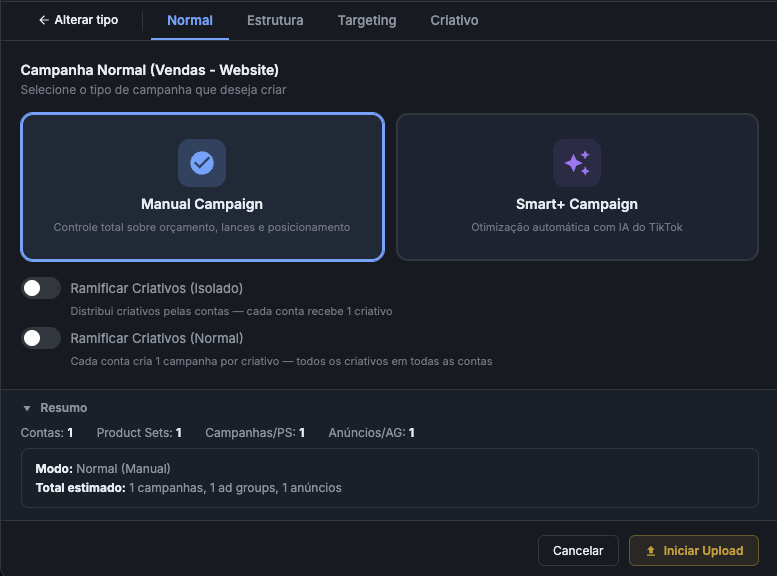
Manual Campaign: full control over budget, bids and placement. Recommended for scaling and A/B testing.
Smart+ Campaign: automatic optimization with TikTok AI. Good for quick tests with little setup.
Isolated mode distributes creatives across accounts (each account gets 1 creative). Normal mode creates 1 campaign per creative on all accounts: multiplies volume.
How many campaigns, ad groups and ads
The Structure tab defines the skeleton: how many campaigns, ad groups, ads and the budget.
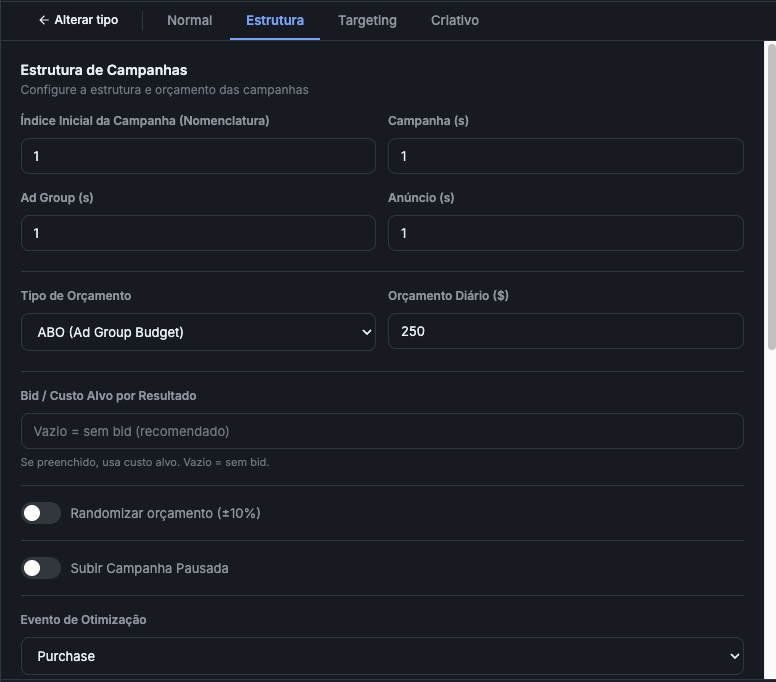
Recommended setup
| Field | Default | When to change |
|---|---|---|
| Initial Index | 1 |
Keep 1 for first batch. If TikTok already has [01], start at 2 |
| Campaign(s) | 1 |
Increase to create multiple identical campaigns per account |
| Ad Group(s) | 1 |
1 is enough in 90% of cases |
| Ad(s) | 1 |
1 spark code = 1 ad. Increase only when rotating creatives |
| Budget Type | ABO |
ABO = adgroup-level budget. CBO = campaign-level (auto-distributes) |
| Daily Budget | $250 |
Start with $50–$100 in tests. Pros scale to $200+ |
| Bid | empty | Empty = TikTok decides. Fill only with tested bid cap |
| Optimization Event | Purchase |
Purchase for ecommerce. Lead for capture. Add to Cart for ToFu |
ABO + $50/day + empty bid. When you find winning copy/creative, scale to CBO + $250/day. CBO lets TikTok distribute budget across the best-performing ad groups.
Delivery speed, countries and languages
Continuation of Structure: defines delivery speed, internal ID and geo targeting.
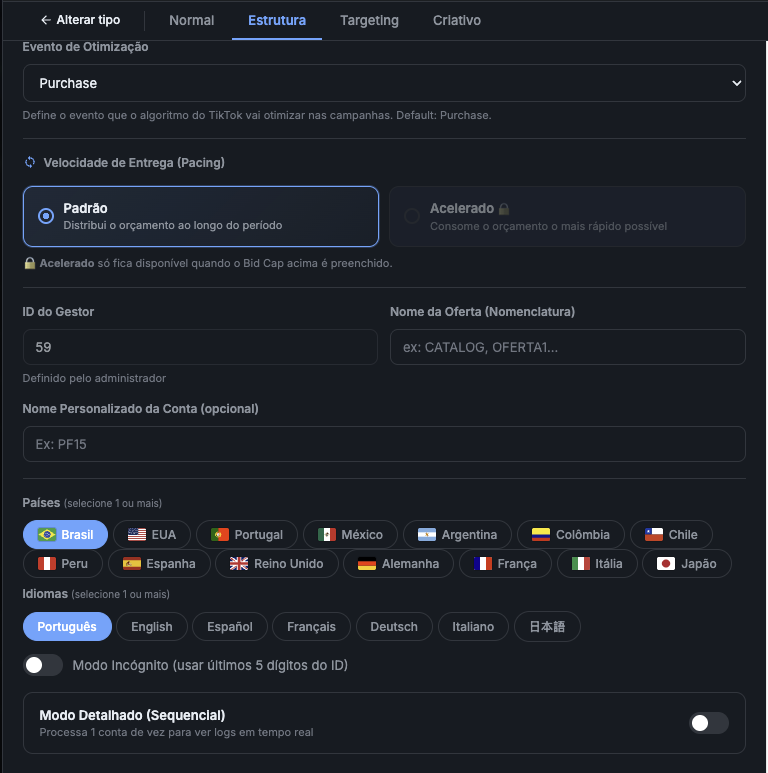
What each field does
- Delivery Speed: Standard distributes budget throughout the day (recommended).
- Delivery Speed: Accelerated consumes as fast as possible. Only available when Bid Cap is filled.
- Manager ID internal identifier (set by admin). Appears in campaign name for tracking.
- Offer Name part of the naming convention. E.g.:
OFFER1,PROMO,BLACK-FRIDAY. - Custom Account Name optional label. E.g.:
PF15,BR-A1. - Countries TikTok requires ≥ 1. Brazil is default for Brazilian ecommerce.
- Languages align with target market. Portuguese for Brazil, English for global.
Incognito uses last 5 digits of ID instead of name: useful for A/B without revealing identity. Detailed (Sequential) processes 1 account at a time instead of parallel: use to debug with real-time logs.
Defining the audience
The Targeting tab defines who sees the ads. Keep it broad initially to let TikTok's algorithm learn.
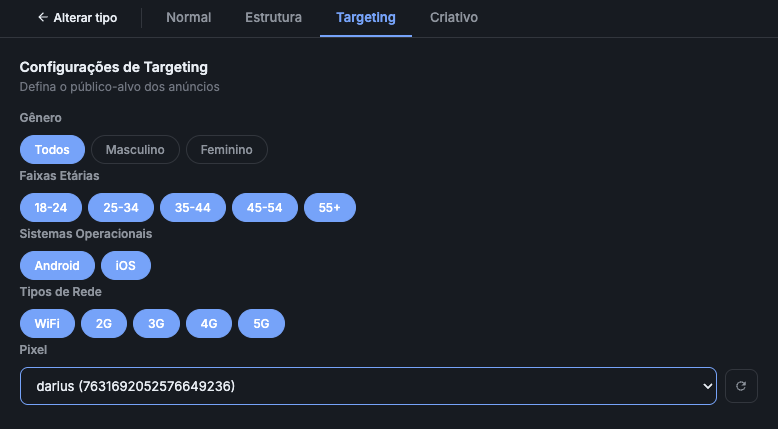
Recommended ecommerce setup
- Gender:
All(more scale): exception: explicit niche products - Age Groups:
18-24,25-34,35-44,45-54,55+(all checked) - Operating Systems:
Android + iOS - Network Types:
WiFi + 2G + 3G + 4G + 5G - Pixel: select the account's pixel (required for Purchase optimization)
If the dropdown is empty, go to Settings → Pixels and register the account's pixel. Without a pixel you can't optimize for Purchase.
Paste the authorization code
The Creative tab: pick "Spark Ads" and paste the creator's authorization code.
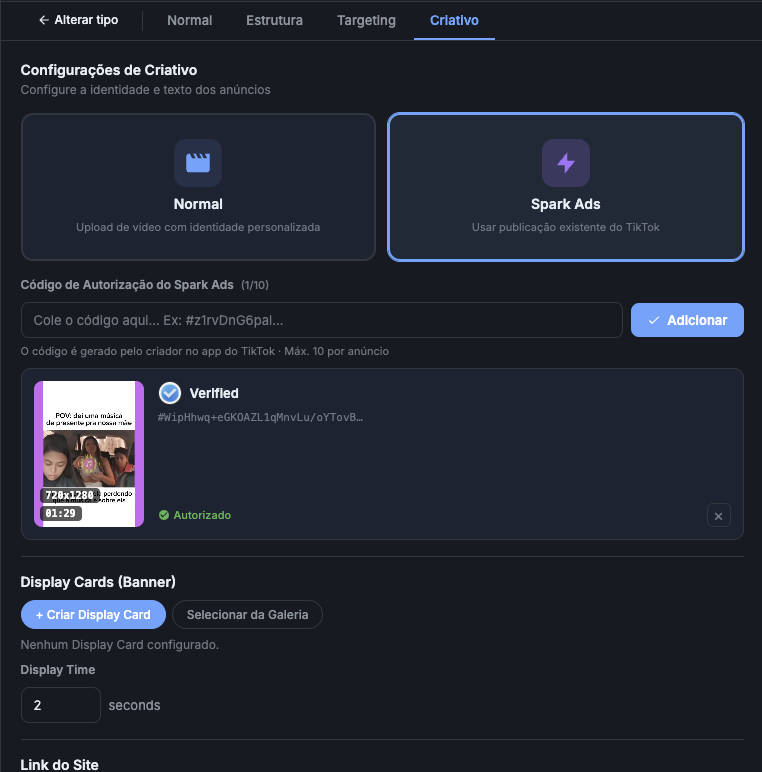
Exact steps
- Click Spark Ads (lightning ⚡ card)
- Paste the code in
#WipHhwq+eGK0AZL1qMnvLu/oYTovB...format - Click Add
- Wait for status to change to ✓ Verified · Authorized (green)
- Confirm the video thumbnail appears + duration + resolution
Ask the creator to generate a new one in the TikTok app (Settings → Creator tools → Account/Spark Ads). Old codes can expire.
Ad(s) in Step 2 and Power Editor automatically creates multiple variations with the same video + different copies.
Display Cards, link, CTA and UTM
Creative continuation: sets banner overlay, landing page, CTA and tracking parameters.
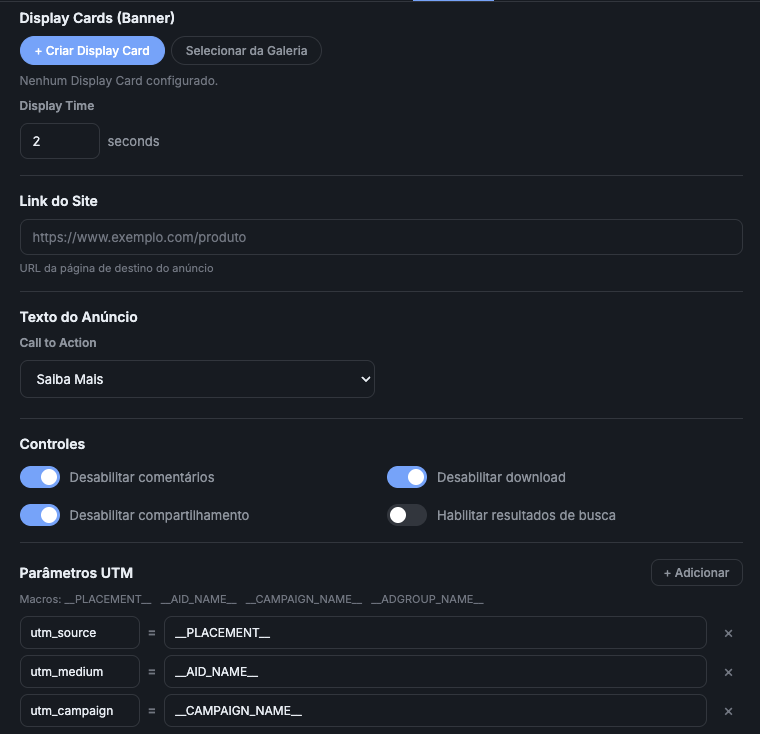
Final settings
- Display Cards (Banner): optional. Appears at the bottom of the video after X seconds. Default Display Time:
2 seconds. - Site Link: full landing page URL. E.g.:
https://mystore.com/product?ref=tiktok - Call to Action:
Learn More(ToFu),Shop Now(retargeting),Sign Up,Subscribe.
Important controls
- Disable comments: recommended on new ads (avoids negative comments while there's no volume)
- Disable download: protects your video
- Disable sharing: controls where the video appears
- Enable search results: only if you want the video to appear in organic search
Default UTM
utm_source     = __PLACEMENT__
utm_medium     = __AID_NAME__
utm_campaign   = __CAMPAIGN_NAME__
utm_content    = __ADGROUP_NAME__
The variables __PLACEMENT__, __AID_NAME__, __CAMPAIGN_NAME__ and __ADGROUP_NAME__ are auto-filled at runtime: they arrive in Google Analytics/Pixel with the actual campaign name.
Ready to upload
After filling all 6 steps:
- Go back to the Normal tab
- Confirm the Summary at the bottom: total campaigns, ad groups and ads estimated
- Click Start Upload (orange button bottom-right)
- Watch real-time progress in the log
~30s per ad. 10 accounts × 1 spark = ~5 min total. Detailed Mode is slower but shows each account being processed in real time.
Common errors + fix
| Error | Cause | Fix |
|---|---|---|
40002: invalid spark code |
Code expired or has 10 active ads | Generate new code in TikTok app |
40016: pixel not found |
Pixel not selected in Step 4 | Go back to Targeting and pick the pixel |
Identity not found |
Account has no identity configured | Configure in TikTok Ads Manager → Identity |
Campaign creation failed |
Insufficient BC balance | Top up Business Center |
| Stuck at "Processing..." | TikTok rate limit | Wait 1 min, BeepMi auto-retries |
Next steps
- Model 1 vs Model 2: when to create multiple campaigns vs multiple accounts
- Automation Rules: automate pause/scaling